1.1若依项目介绍
若依是一款开源的后台管理系统,可以用于所有的Web应用程序,如网站管理后台,网站会员中心,CMS,CRM,OA。

所有前端后台代码封装过后十分精简易上手,出错概率低。同时支持移动客户端访问。系统会陆续更新一些实用功能。

若依是一套全部开源的快速开发平台,毫无保留给个人及企业免费使用。


官网链接:
	https://ruoyi.vip/

gitee地址:
	https://gitee.com/y_project/RuoYi

部署文档:
	https://doc.ruoyi.vip/ruoyi/
1.2安装jdk环境
	1.下载jdk
[root@harbor250.oldboyedu.com ~]# wget http://192.168.21.253/Resources/Kubernetes/Project/DevOps/Jenkins/jdk-17_linux-x64_bin.tar.gz

	2.解压软件包
[root@harbor250.oldboyedu.com ~]# tar xf jdk-17_linux-x64_bin.tar.gz -C /usr/local/

	3.配置环境变量
[root@harbor250.oldboyedu.com ~]# cat /etc/profile.d/jdk.sh
#!/bin/bash

export JAVA_HOME=/usr/local/jdk-17.0.8
export PATH=$PATH:$JAVA_HOME/bin
[root@harbor250.oldboyedu.com ~]#

	4.加载环境变量
[root@harbor250.oldboyedu.com ~]# source  /etc/profile.d/jdk.sh
[root@harbor250.oldboyedu.com ~]#

	5.测试验证
[root@harbor250.oldboyedu.com ~]# java --version
java 17.0.8 2023-07-18 LTS
Java(TM) SE Runtime Environment (build 17.0.8+9-LTS-211)
Java HotSpot(TM) 64-Bit Server VM (build 17.0.8+9-LTS-211, mixed mode, sharing)
#/etc/profile.d/jdk.sh 是一个系统级的Java环境变量配置文件。
bash
#!/bin/bash # 指定脚本用bash解释器执行
export JAVA_HOME=/usr/local/jdk-17.0.8 # 设置JAVA_HOME环境变量
export PATH=$PATH:$JAVA_HOME/bin # 将Java的bin目录添加到PATH中
JAVA_HOME作用:告诉系统Java 装在哪里
路径:JDK 17.0.8 安装在 /usr/local/jdk-17.0.8/
很多 Java 应用需要知道 JAVA_HOME 才能运行
开发工具(如 Maven、Gradle)需要它来编译项目
Tomcat、Jenkins 等中间件需要它
PATH作用
$PATH:当前已有的PATH值
$JAVA_HOME/bin:Java的可执行文件目录
:是Linux 中 PATH 的分隔符
效果:可以在任意目录直接运行java、javac 等命令
这个目录的特点:
系统启动时自动加载:用户登录时自动执行该目录下的所有 .sh 文件
对所有用户生效:全局配置,影响所有登录用户
模块化配置:每个功能一个文件,便于管理
无需修改主文件:避免直接修改 /etc/profile 或 ~/.bashrc1.3部署MySQL数据库
	1.准备证书文件
[root@harbor250.oldboyedu.com ~]# mkdir -p /etc/docker/certs.d/harbor250.oldboyedu.com/
[root@harbor250.oldboyedu.com ~]#
[root@harbor250.oldboyedu.com ~]# cp /usr/local/harbor/certs/docker-client/* /etc/docker/certs.d/harbor250.oldboyedu.com/
[root@harbor250.oldboyedu.com ~]#
[root@harbor250.oldboyedu.com ~]# ll /etc/docker/certs.d/harbor250.oldboyedu.com/
total 20
drwxr-xr-x 2 root root 4096 Jan 12 16:04 ./
drwxr-xr-x 3 root root 4096 Jan 12 16:04 ../
-rw-r--r-- 1 root root 2049 Jan 12 16:04 ca.crt
-rw-r--r-- 1 root root 2155 Jan 12 16:04 harbor250.oldboyedu.com.cert
-rw------- 1 root root 3272 Jan 12 16:04 harbor250.oldboyedu.com.key
[root@harbor250.oldboyedu.com ~]#


	2.拉取MySQL镜像
[root@harbor250.oldboyedu.com ~]# docker pull harbor250.oldboyedu.com/oldboyedu-db/mysql:8.0.36-oracle

[root@harbor250.oldboyedu.com ~]# docker image ls harbor250.oldboyedu.com/oldboyedu-db/mysql
REPOSITORY                                   TAG             IMAGE ID       CREATED         SIZE
harbor250.oldboyedu.com/oldboyedu-db/mysql   8.0.36-oracle   f5f171121fa3   21 months ago   603MB
[root@harbor250.oldboyedu.com ~]#


	3.运行MySQL服务
[root@harbor250.oldboyedu.com ~]# docker run -d \
	--name mysql-server \
	-e MYSQL_DATABASE=ruoyi \
	-e MYSQL_USER=linux101 \
	-e MYSQL_PASSWORD=oldboyedu \
	-e MYSQL_ALLOW_EMPTY_PASSWORD=yes \
	--network host \
	harbor250.oldboyedu.com/oldboyedu-db/mysql:8.0.36-oracle \
    --character-set-server=utf8mb4 \
    --collation-server=utf8mb4_unicode_ci \
    --default-authentication-plugin=mysql_native_password


    4.查看MySQL容器
[root@harbor250.oldboyedu.com ~]# docker ps -l   #-l 是--latest的简写,表示显示最近创建的容器(包括已停止的)
CONTAINER ID   IMAGE                                                      COMMAND                  CREATED         STATUS        PORTS     NAMES
4580d03735b7   harbor250.oldboyedu.com/oldboyedu-db/mysql:8.0.36-oracle   "docker-entrypoint.s…"   3 seconds ago   Up 1 second             mysql-server
[root@harbor250.oldboyedu.com ~]#
[root@harbor250.oldboyedu.com ~]# ss -ntl | grep 3306
LISTEN 0      151                *:3306             *:*
LISTEN 0      70                 *:33060            *:*
[root@harbor250.oldboyedu.com ~]#


    5.链接测试
[root@harbor250.oldboyedu.com ~]# docker exec -it mysql-server mysql ruoyi
Welcome to the MySQL monitor.  Commands end with ; or \g.
Your MySQL connection id is 8
Server version: 8.0.36 MySQL Community Server - GPL

Copyright (c) 2000, 2024, Oracle and/or its affiliates.

Oracle is a registered trademark of Oracle Corporation and/or its
affiliates. Other names may be trademarks of their respective
owners.

Type 'help;' or '\h' for help. Type '\c' to clear the current input statement.

mysql> SHOW DATABASES;
+--------------------+
| Database           |
+--------------------+
| information_schema |
| mysql              |
| performance_schema |
| ruoyi              |
| sys                |
+--------------------+
5 rows in set (0.00 sec)

mysql>
mysql> SELECT DATABASE();
+------------+
| DATABASE() |
+------------+
| ruoyi      |
+------------+
1 row in set (0.00 sec)

mysql>
mysql> SHOW TABLES;
Empty set (0.00 sec)

mysql>
mysql> SELECT user,host,plugin FROM mysql.user;
+------------------+-----------+-----------------------+
| user             | host      | plugin                |
+------------------+-----------+-----------------------+
| linux101         | %         | mysql_native_password |
| root             | %         | mysql_native_password |
| mysql.infoschema | localhost | caching_sha2_password |
| mysql.session    | localhost | caching_sha2_password |
| mysql.sys        | localhost | caching_sha2_password |
| root             | localhost | mysql_native_password |
+------------------+-----------+-----------------------+
6 rows in set (0.00 sec)

mysql>


	6.修改MySQL客户端链接的字符集
[root@harbor250.oldboyedu.com RuoYi]# docker exec -it mysql-server bash
bash-4.4#
bash-4.4# mysql
mysql> SHOW VARIABLES LIKE '%character%';  # 查看默认的字符集
+--------------------------+--------------------------------+
| Variable_name            | Value                          |
+--------------------------+--------------------------------+
| character_set_client     | latin1                         |
| character_set_connection | latin1                         |
| character_set_database   | utf8mb4                        |
| character_set_filesystem | binary                         |
| character_set_results    | latin1                         |
| character_set_server     | utf8mb4                        |
| character_set_system     | utf8mb3                        |
| character_sets_dir       | /usr/share/mysql-8.0/charsets/ |
+--------------------------+--------------------------------+
8 rows in set (0.01 sec)

mysql>
bash-4.4# cat > /etc/my.cnf <<EOF
1.4部署Maven软件
	1.下载maven
[root@harbor250.oldboyedu.com ~]# wget https://dlcdn.apache.org/maven/maven-3/3.9.12/binaries/apache-maven-3.9.12-bin.tar.gz


	2.解压软件包
[root@harbor250.oldboyedu.com ~]# tar xf apache-maven-3.9.12-bin.tar.gz -C /usr/local/
[root@harbor250.oldboyedu.com ~]#


	3.配置环境变量
[root@harbor250.oldboyedu.com ~]# cat /etc/profile.d/mvn.sh
#!/bin/bash

export MAVEN_HOME=/usr/local/apache-maven-3.9.12
export PATH=$PATH:$MAVEN_HOME/bin

[root@harbor250.oldboyedu.com ~]#
[root@harbor250.oldboyedu.com ~]# source  /etc/profile.d/mvn.sh
[root@harbor250.oldboyedu.com ~]#
[root@harbor250.oldboyedu.com ~]# mvn --version
Apache Maven 3.9.12 (848fbb4bf2d427b72bdb2471c22fced7ebd9a7a1)
Maven home: /usr/local/apache-maven-3.9.12
Java version: 17.0.8, vendor: Oracle Corporation, runtime: /usr/local/jdk-17.0.8
Default locale: en_US, platform encoding: UTF-8
OS name: "linux", version: "5.15.0-119-generic", arch: "amd64", family: "unix"
[root@harbor250.oldboyedu.com ~]#


	4.配置maven加速(可选)
[root@harbor250.oldboyedu.com ~]# vim  /usr/local/apache-maven-3.9.12/conf/settings.xml
...
<mirrors>
    <mirror>
        <id>alimaven</id>
        <mirrorOf>central</mirrorOf>
        <name>aliyun maven</name>
        <url>https://maven.aliyun.com/repository/public</url>
    </mirror>
</mirrors>
1.5编译若依服务运行测试
	1.拉取代码
[root@harbor250.oldboyedu.com ~]# git clone https://gitee.com/y_project/RuoYi.git


	2.修改数据库连接,编辑resources目录下的application-druid.yml
[root@harbor250.oldboyedu.com ~]# vim RuoYi/ruoyi-admin/src/main/resources/application-druid.yml
  1 # 数据源配置
  2 spring:
  3     datasource:
  4         type: com.alibaba.druid.pool.DruidDataSource
  5         driverClassName: com.mysql.cj.jdbc.Driver
  6         druid:
  7             # 主库数据源
  8             master:
  9                 url: jdbc:mysql://localhost:3306/ruoyi?useUnicode=true&characterEncoding=utf8&zeroDateTimeBehavior=convertToNull&us    eSSL=true&serverTimezone=GMT%2B8
 10                 username: linux101
 11                 password: oldboyedu
 ...


 	3.修改服务器配置,编辑resources目录下的application.yml
[root@harbor250.oldboyedu.com ~]# vim RuoYi/ruoyi-admin/src/main/resources/application.yml
...
 17 server:
 18   # 服务器的HTTP端口,默认为80
 19   port: 8080


 	4.编译程序
[root@harbor250.oldboyedu.com ~]# cd RuoYi/
[root@harbor250.oldboyedu.com RuoYi]#
[root@harbor250.oldboyedu.com RuoYi]# mvn clean package -Dmaven.test.skip=true   #-Dmaven.test.skip=true 跳过Maven的测试阶段,不编译和运行测试代码。
...
[INFO] Replacing main artifact with repackaged archive
[INFO] ------------------------------------------------------------------------
[INFO] Reactor Summary for ruoyi 4.8.2:
[INFO]
[INFO] ruoyi .............................................. SUCCESS [  0.810 s]
[INFO] ruoyi-common ....................................... SUCCESS [ 24.712 s]
[INFO] ruoyi-system ....................................... SUCCESS [  0.697 s]
[INFO] ruoyi-framework .................................... SUCCESS [  4.574 s]
[INFO] ruoyi-quartz ....................................... SUCCESS [  0.625 s]
[INFO] ruoyi-generator .................................... SUCCESS [  0.539 s]
[INFO] ruoyi-admin ........................................ SUCCESS [ 11.867 s]
[INFO] ------------------------------------------------------------------------
[INFO] BUILD SUCCESS
[INFO] ------------------------------------------------------------------------
[INFO] Total time:  46.270 s  # 编译时间较短,46s左右。
[INFO] Finished at: 2026-01-12T16:28:22+08:00
[INFO] ------------------------------------------------------------------------
[root@harbor250.oldboyedu.com RuoYi]#

	5.导入数据库
[root@harbor250.oldboyedu.com RuoYi]# docker cp sql/quartz.sql mysql-server:/
[root@harbor250.oldboyedu.com RuoYi]#
[root@harbor250.oldboyedu.com RuoYi]# docker cp sql/ry_20250416.sql mysql-server:/
[root@harbor250.oldboyedu.com RuoYi]#
[root@harbor250.oldboyedu.com RuoYi]# docker exec -it mysql-server bash
bash-4.4# ls -l /*.sql
-rw-r--r-- 1 root root 11985 Jan 12 08:20 /quartz.sql
-rw-r--r-- 1 root root 60934 Jan 12 08:20 /ry_20250416.sql
bash-4.4#
bash-4.4# mysql ruoyi < /quartz.sql   #需指定ruoyi数据库
bash-4.4# mysql ruoyi < /ry_20250416.sql
bash-4.4#
bash-4.4# mysql ruoyi
Reading table information for completion of table and column names
You can turn off this feature to get a quicker startup with -A

Welcome to the MySQL monitor.  Commands end with ; or \g.
Your MySQL connection id is 17
Server version: 8.0.36 MySQL Community Server - GPL

Copyright (c) 2000, 2024, Oracle and/or its affiliates.

Oracle is a registered trademark of Oracle Corporation and/or its
affiliates. Other names may be trademarks of their respective
owners.

Type 'help;' or '\h' for help. Type '\c' to clear the current input statement.

mysql> SHOW TABLES;
+--------------------------+
| Tables_in_ruoyi          |
+--------------------------+
| QRTZ_BLOB_TRIGGERS       |
| QRTZ_CALENDARS           |
| QRTZ_CRON_TRIGGERS       |
| QRTZ_FIRED_TRIGGERS      |
| QRTZ_JOB_DETAILS         |
| QRTZ_LOCKS               |
| QRTZ_PAUSED_TRIGGER_GRPS |
| QRTZ_SCHEDULER_STATE     |
| QRTZ_SIMPLE_TRIGGERS     |
| QRTZ_SIMPROP_TRIGGERS    |
| QRTZ_TRIGGERS            |
| gen_table                |
| gen_table_column         |
| sys_config               |
| sys_dept                 |
| sys_dict_data            |
| sys_dict_type            |
| sys_job                  |
| sys_job_log              |
| sys_logininfor           |
| sys_menu                 |
| sys_notice               |
| sys_oper_log             |
| sys_post                 |
| sys_role                 |
| sys_role_dept            |
| sys_role_menu            |
| sys_user                 |
| sys_user_online          |
| sys_user_post            |
| sys_user_role            |
+--------------------------+
31 rows in set (0.00 sec)

mysql>


	6.运行jar包文件
[root@harbor250.oldboyedu.com RuoYi]# java -jar ruoyi-admin/target/ruoyi-admin.jar
Application Version: 4.8.2
Spring Boot Version: 2.5.15
////////////////////////////////////////////////////////////////////
//                          _ooOoo_                               //
//                         o8888888o                              //
//                         88" . "88                              //
//                         (| ^_^ |)                              //
//                         O\  =  /O                              //
//                      ____/`---'\____                           //
//                    .'  \\|     |//  `.                         //
//                   /  \\|||  :  |||//  \                        //
//                  /  _||||| -:- |||||-  \                       //
//                  |   | \\\  -  /// |   |                       //
//                  | \_|  ''\---/''  |   |                       //
//                  \  .-\__  `-`  ___/-. /                       //
//                ___`. .'  /--.--\  `. . ___                     //
//              ."" '<  `.___\_<|>_/___.'  >'"".                  //
//            | | :  `- \`.;`\ _ /`;.`/ - ` : | |                 //
//            \  \ `-.   \_ __\ /__ _/   .-` /  /                 //
//      ========`-.____`-.___\_____/___.-`____.-'========         //
//                           `=---='                              //
//      ^^^^^^^^^^^^^^^^^^^^^^^^^^^^^^^^^^^^^^^^^^^^^^^^^^        //
//             佛祖保佑       永不宕机      永无BUG               //
////////////////////////////////////////////////////////////////////
...
(♥◠‿◠)ノ゙  若依启动成功   ლ(´ڡ`ლ)゙
 .-------.       ____     __
 |  _ _   \      \   \   /  /
 | ( ' )  |       \  _. /  '
 |(_ o _) /        _( )_ .'
 | (_,_).' __  ___(_ o _)'
 |  |\ \  |  ||   |(_,_)'
 |  | \ `'   /|   `-'  /
 |  |  \    /  \      /
 ''-'   `'-'    `-..-'

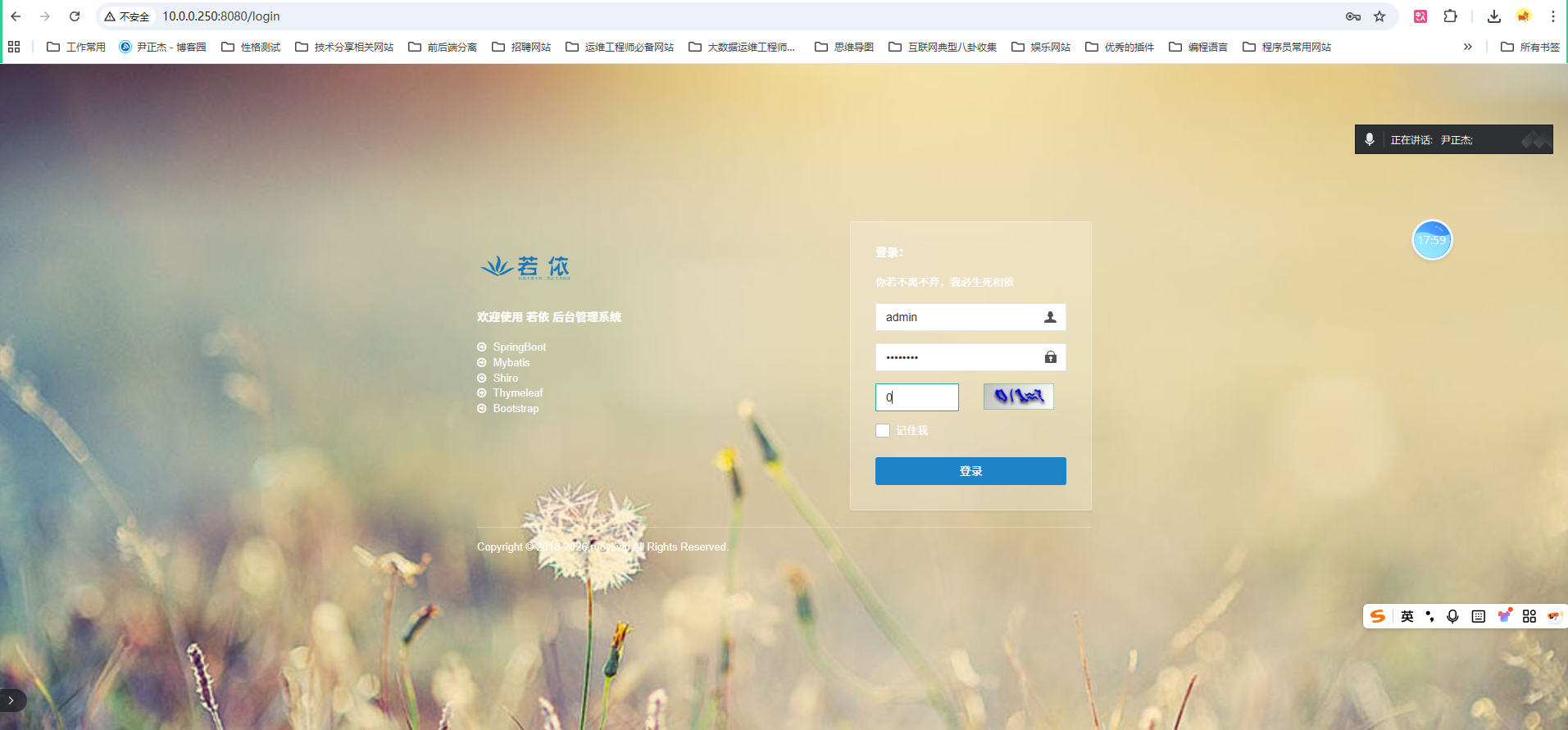
	7.访问测试【如上图所示】
[root@harbor250.oldboyedu.com ~]# ss -ntl | grep 8080
LISTEN 0      1000               *:8080             *:*
[root@harbor250.oldboyedu.com ~]#

温馨提示:
	登录成功后,查看效果如下图所示。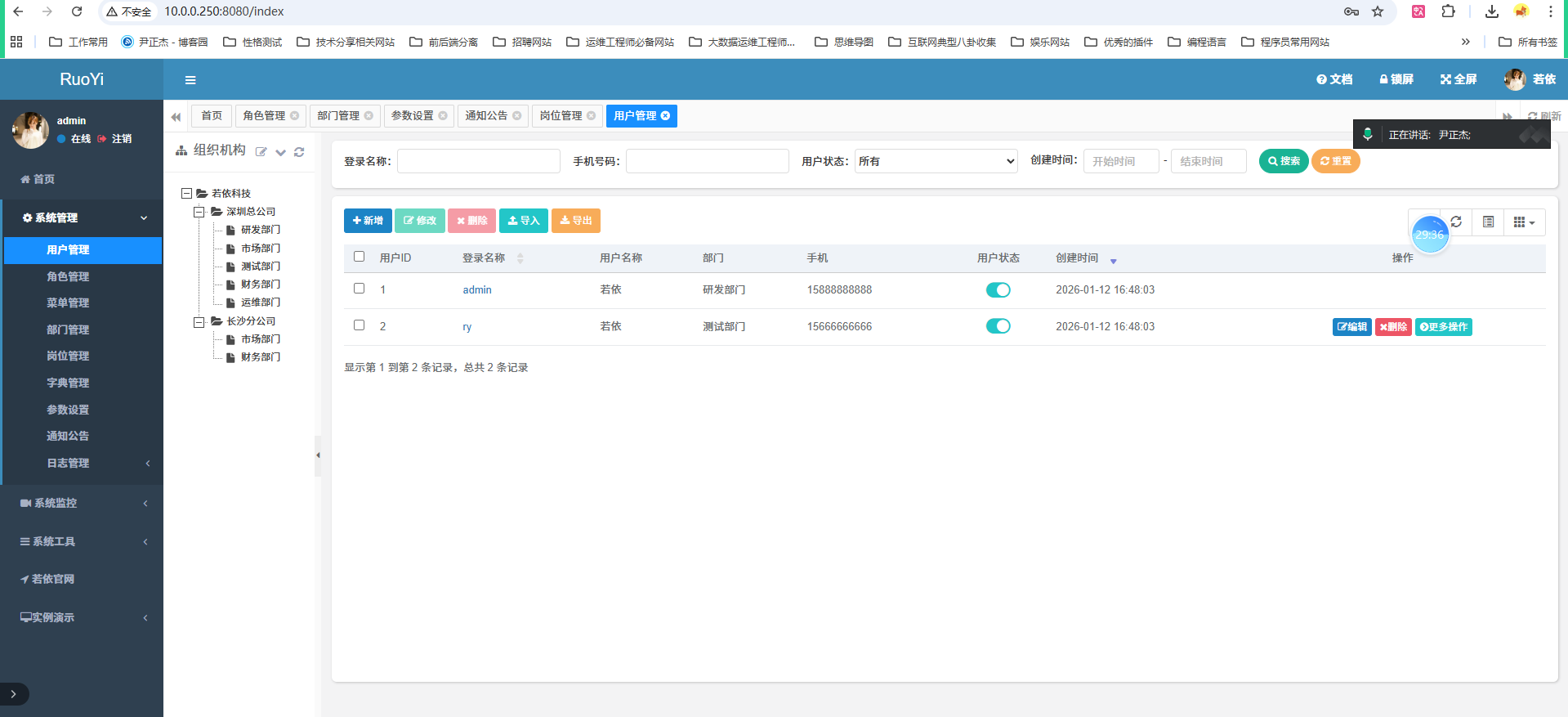
1.6修复乱码问题
我们使用MySQL8.0+版本部署若依,发现存在乱码问题。

解决方案有两种:
	- A.就是降低数据库版本,比如"MySQL 5.7"或者"mariadb 10.6.22"。
	- B.修改客户端链接工具的字符集; (推荐)

实操案例:
	1.安装mariadb服务
[root@harbor250.oldboyedu.com ~]# apt -y install mariadb-server
[root@harbor250.oldboyedu.com ~]# mariadb -V
mariadb  Ver 15.1 Distrib 10.6.22-MariaDB, for debian-linux-gnu (x86_64) using  EditLine wrapper
[root@harbor250.oldboyedu.com ~]#
[root@harbor250.oldboyedu.com ~]# systemctl restart mariadb

[root@harbor250.oldboyedu.com ~]# ss -ntl | grep 3306
LISTEN 0      80         127.0.0.1:3306      0.0.0.0:*
[root@harbor250.oldboyedu.com ~]#


	2.创建用户并授权
[root@harbor250.oldboyedu.com ~]# mysql
Welcome to the MariaDB monitor.  Commands end with ; or \g.
Your MariaDB connection id is 31
Server version: 10.6.22-MariaDB-0ubuntu0.22.04.1 Ubuntu 22.04

Copyright (c) 2000, 2018, Oracle, MariaDB Corporation Ab and others.

Type 'help;' or '\h' for help. Type '\c' to clear the current input statement.

MariaDB [(none)]> CREATE DATABASE ruoyi;
Query OK, 1 row affected (0.001 sec)

MariaDB [(none)]>
MariaDB [(none)]> CREATE USER linux101;
Query OK, 0 rows affected (0.001 sec)

MariaDB [(none)]>
MariaDB [(none)]> ALTER USER linux101 IDENTIFIED BY 'oldboyedu';
Query OK, 0 rows affected (0.000 sec)

MariaDB [(none)]>
MariaDB [(none)]> GRANT ALL PRIVILEGES ON ruoyi.* TO linux101;
Query OK, 0 rows affected (0.001 sec)

MariaDB [(none)]>
MariaDB [(none)]> SHOW GRANTS FOR linux101;
+-----------------------------------------------------+
| Grants for linux101@%                               |
+-----------------------------------------------------+
| GRANT USAGE ON *.* TO `linux101`@`%`                |
| GRANT ALL PRIVILEGES ON `ruoyi`.* TO `linux101`@`%` |
+-----------------------------------------------------+
2 rows in set (0.000 sec)

MariaDB [(none)]>
MariaDB [(none)]> SHOW VARIABLES LIKE '%character%';
+--------------------------+----------------------------+
| Variable_name            | Value                      |
+--------------------------+----------------------------+
| character_set_client     | utf8mb3                    |
| character_set_connection | utf8mb3                    |
| character_set_database   | utf8mb4                    |
| character_set_filesystem | binary                     |
| character_set_results    | utf8mb3                    |
| character_set_server     | utf8mb4                    |
| character_set_system     | utf8mb3                    |
| character_sets_dir       | /usr/share/mysql/charsets/ |
+--------------------------+----------------------------+
8 rows in set (0.001 sec)

MariaDB [(none)]>


	3.导入数据库表结构
[root@harbor250.oldboyedu.com ~]# mysql ruoyi < RuoYi/sql/quartz.sql
[root@harbor250.oldboyedu.com ~]#
[root@harbor250.oldboyedu.com ~]# mysql ruoyi < RuoYi/sql/ry_20250416.sql
[root@harbor250.oldboyedu.com ~]#
[root@harbor250.oldboyedu.com ~]# mysql -e "SHOW TABLES FROM ruoyi"
+--------------------------+
| Tables_in_ruoyi          |
+--------------------------+
| QRTZ_BLOB_TRIGGERS       |
| QRTZ_CALENDARS           |
| QRTZ_CRON_TRIGGERS       |
| QRTZ_FIRED_TRIGGERS      |
| QRTZ_JOB_DETAILS         |
| QRTZ_LOCKS               |
| QRTZ_PAUSED_TRIGGER_GRPS |
| QRTZ_SCHEDULER_STATE     |
| QRTZ_SIMPLE_TRIGGERS     |
| QRTZ_SIMPROP_TRIGGERS    |
| QRTZ_TRIGGERS            |
| gen_table                |
| gen_table_column         |
| sys_config               |
| sys_dept                 |
| sys_dict_data            |
| sys_dict_type            |
| sys_job                  |
| sys_job_log              |
| sys_logininfor           |
| sys_menu                 |
| sys_notice               |
| sys_oper_log             |
| sys_post                 |
| sys_role                 |
| sys_role_dept            |
| sys_role_menu            |
| sys_user                 |
| sys_user_online          |
| sys_user_post            |
| sys_user_role            |
+--------------------------+
[root@harbor250.oldboyedu.com ~]#
完结
作者

2632782425@qq.com
相关文章